Social Content Agent is a deployed, AI-assisted LinkedIn content workflow built with Next.js, OpenAI, Supabase, and Vercel. It treats an LLM-generated post as a reviewable starting point—not an automatic publishing decision.
The problem: generation is not the whole workflow
A prompt can produce a social-media draft in seconds. That does not solve the practical workflow around publishing it.
For a person using AI to support their professional presence, a useful product needs more than a model call: draft ownership, room to revise the output, a clear approval step, scheduled work, and a record of what happened. I built Social Content Agent to explore that boundary.
The product lets a signed-in user generate a LinkedIn post from a topic and saved brand-voice preferences. From there, the user can edit the text, save the draft, approve it, schedule it, and review the activity timeline.
One scope boundary is intentional: the application does not publish directly to LinkedIn or another social network. Its protected scheduled job simulates publication by transitioning due drafts in the application database and recording the result in the activity history. A real provider integration would add OAuth, account connection, token storage and refresh, provider-specific errors, retries, and a user-facing connection-management experience.
Product walkthrough
The 51-second demo video shows the workflow end to end. The screenshots below capture the same states.
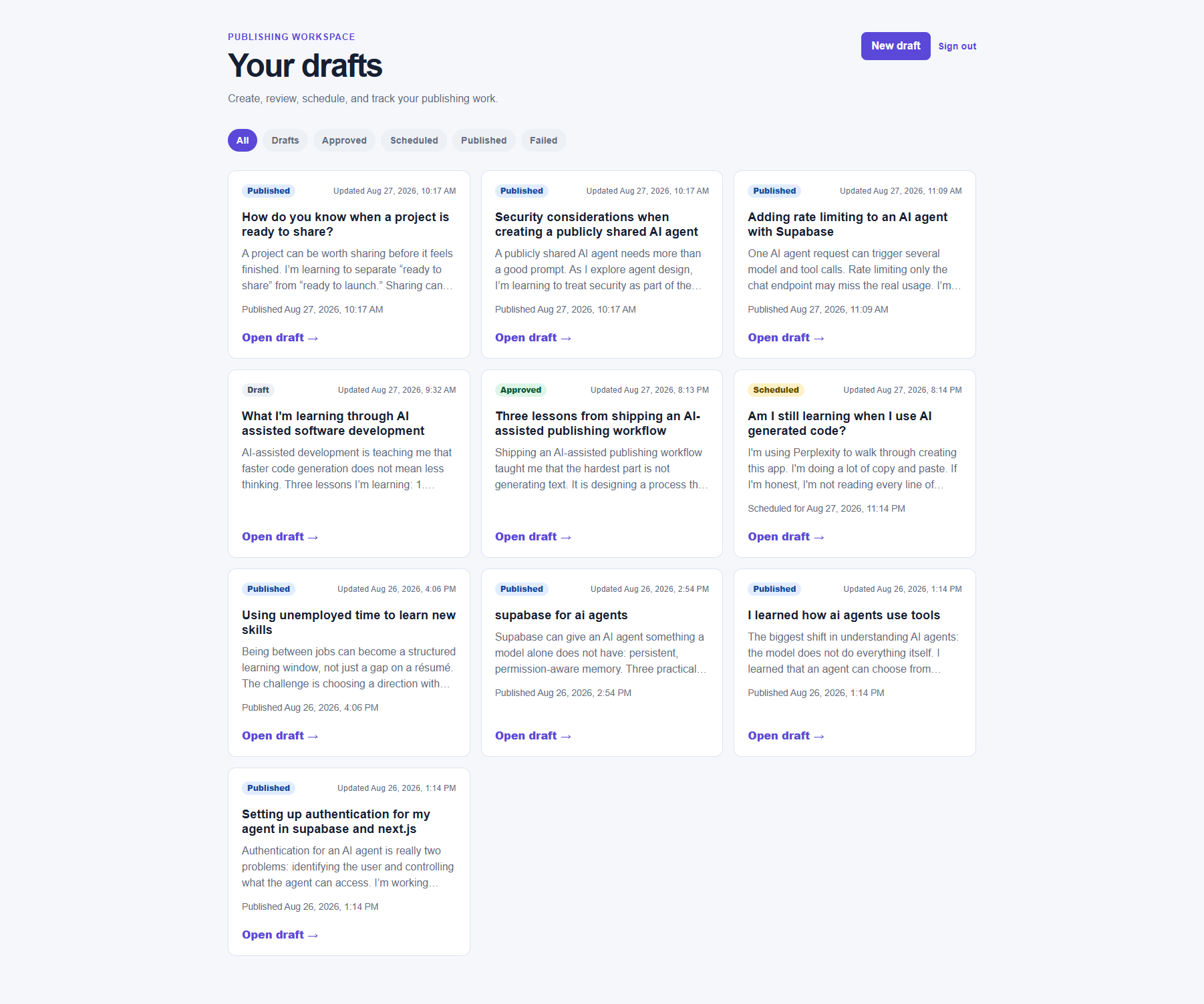
1. A user starts with a draft library
The dashboard gives each user a place to find and manage their drafts by workflow status. This makes the work visible as a sequence of states, rather than treating generation as a one-time chat interaction.
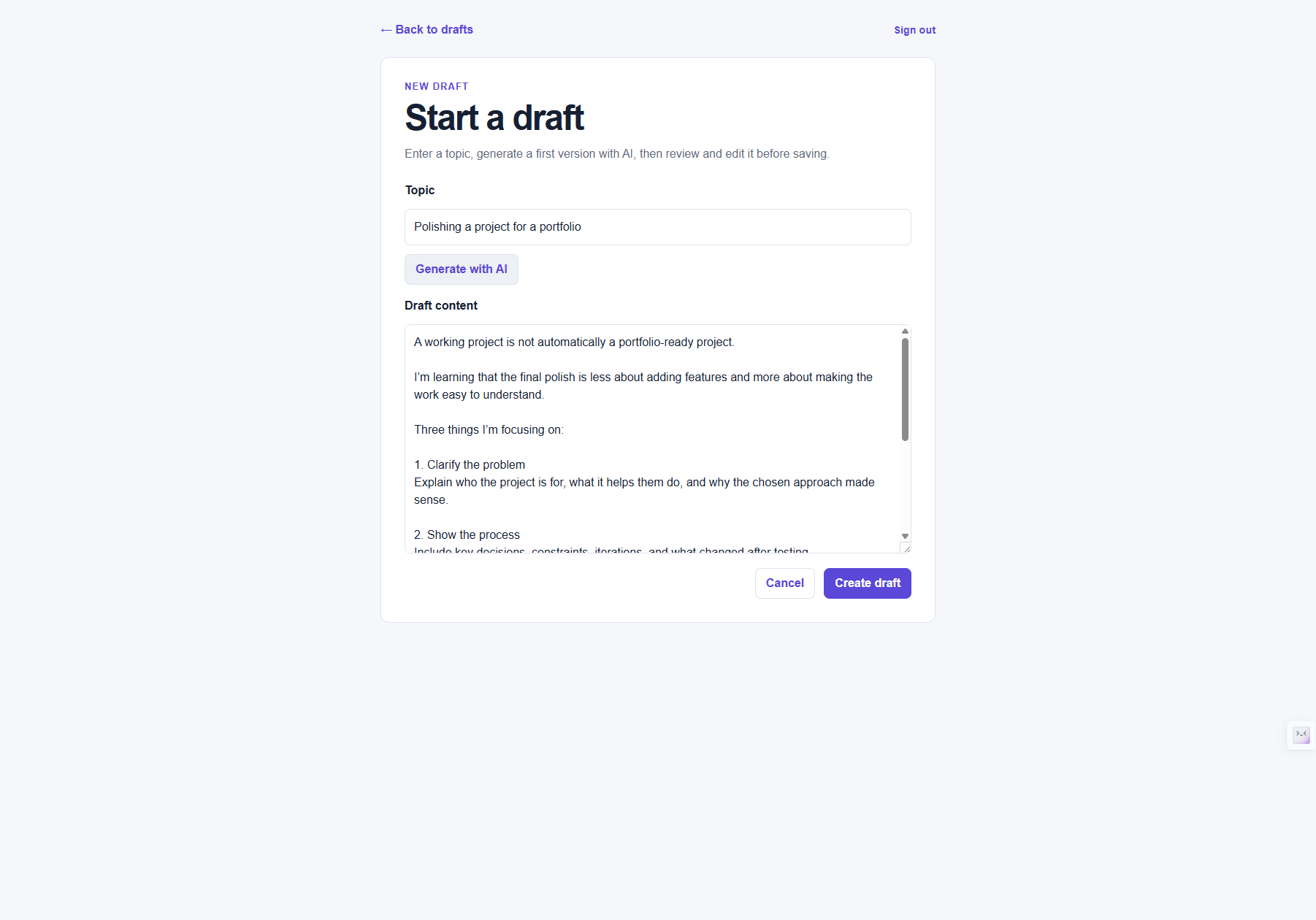
2. AI generates a starting point, not the final action
The new-draft experience accepts a topic and uses the user’s saved brand voice to create an initial LinkedIn post. The generated text returns to an editable form. The user can change it before it is ever saved, approved, or scheduled.
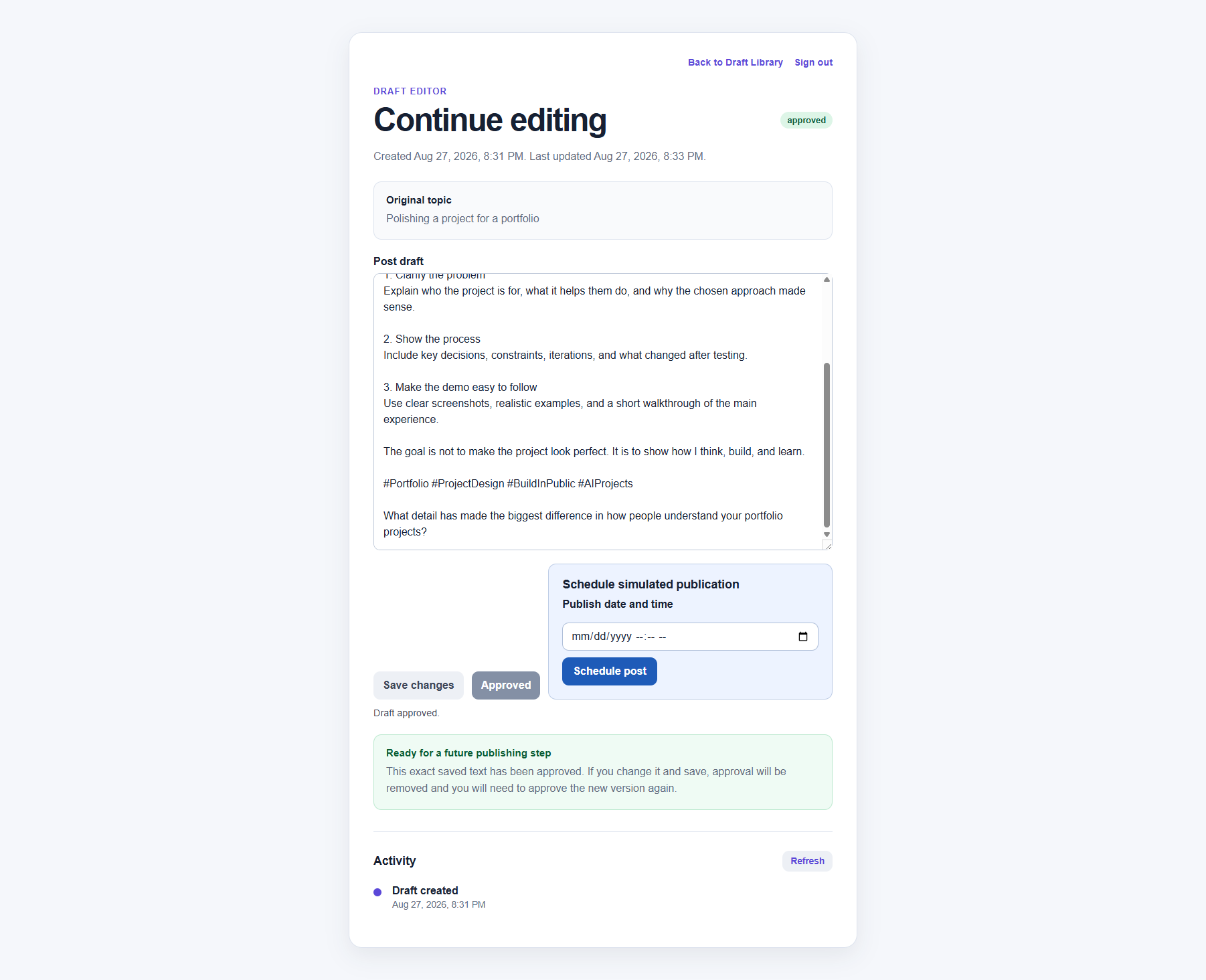
3. Approval is explicit before scheduling
A saved draft has to be approved before the scheduling control is available. This is a deliberate product rule: generated output and a saved draft do not imply permission to schedule a publishing action.
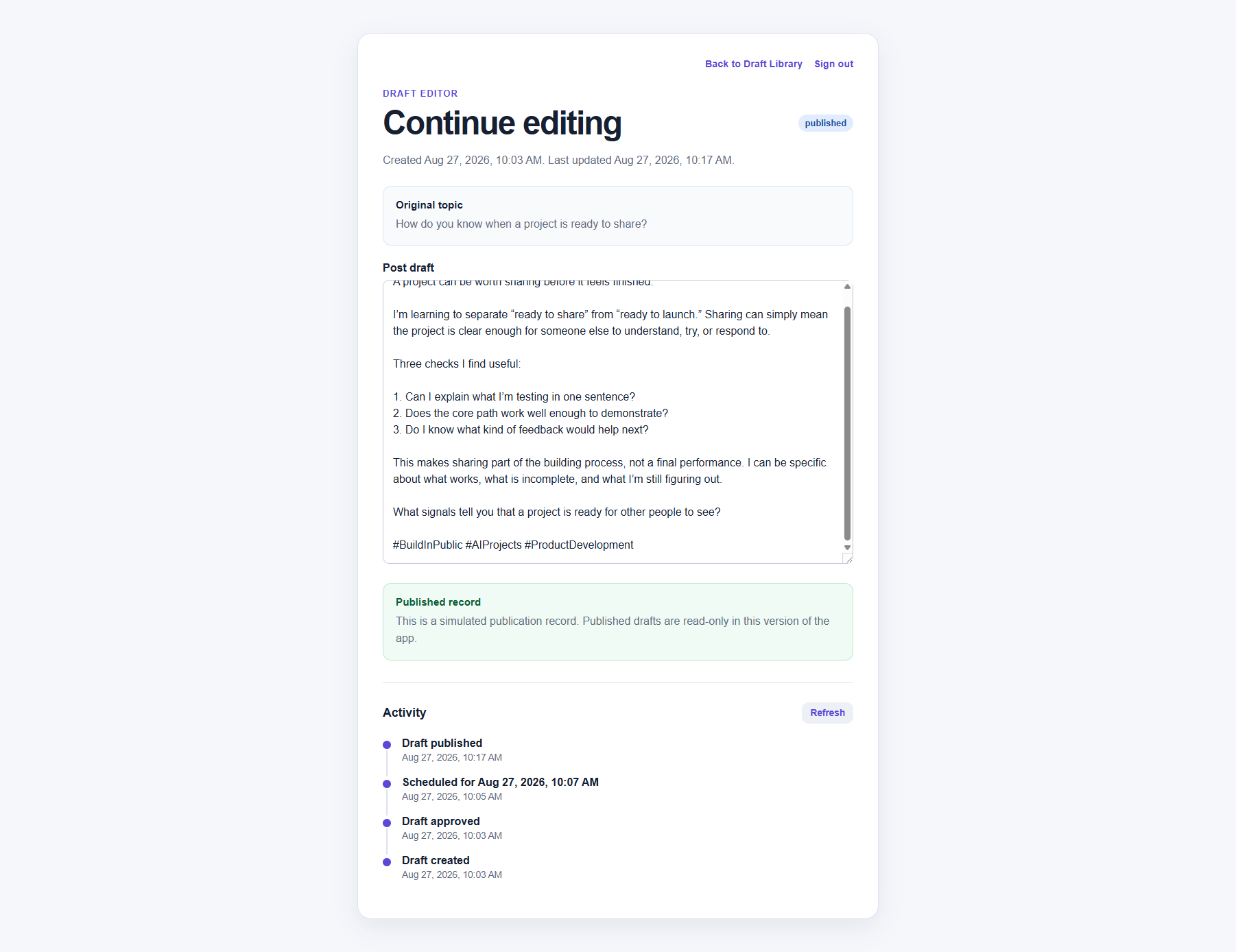
4. Current state and history are separate
The draft page shows a current status and an activity timeline. That distinction matters: status answers where a draft is now; the event history answers how it arrived there.
Architecture
Next.js UI
  └─ Draft dashboard → editor → activity timeline
       │
       ├─ Authenticated route handlers
       │    ├─ /api/generate-draft → OpenAI Responses API
       │    ├─ /api/drafts → draft state and edits
       │    └─ /api/jobs/publish-due-drafts → protected publisher job
       │
       └─ Supabase
            ├─ Auth
            ├─ Postgres: drafts, draft_events, generation_requests, brand_voices
            └─ Row Level Security policies

Vercel Cron → protected publisher route → due scheduled drafts → simulated published state + activity event
Engineering decisions behind the workflow
1. Keep human review in the critical path
The app does not automatically turn an OpenAI response into a scheduled post. The workflow expects a person to review and edit the result, then explicitly approve it before scheduling. That keeps the human responsible for the final content and reduces the chance that a plausible but inaccurate draft becomes an irreversible action.
2. Model the workflow with explicit states
The UI and data model distinguish between draft, approved, scheduled, published, and publish-failed states. The approval gate is not only visual: it is part of the workflow rules that determine which actions are allowed next. This gives the product a clearer operational model than a single “generated” flag.
3. Preserve an event history instead of inferring it later
The project uses a draft_events table in addition to the current draft record. Creating, updating, approving, scheduling, publishing, and publish-failure events can be recorded as distinct entries. This makes the activity timeline possible now and creates a foundation for future audit, retry, analytics, and team-review features.
4. Treat generation and background work as protected server-side operations
OpenAI generation happens in a server-side route handler after the app checks for an authenticated Supabase user. The OpenAI key stays out of the browser. The handler validates topic input and records generation requests so it can enforce a per-user limit of 10 generations per hour.
The scheduled publisher is also server-side. Its route checks a CRON_SECRET bearer token before it processes due drafts. It targets drafts that are still in the scheduled state, so a later run should not republish a draft that has already moved forward. This is especially important for scheduled work that may be retried.
Security and verification boundaries
The codebase implements user-scoped data access through Supabase Auth and Row Level Security policies for the relevant tables. It uses server-only environment variables for the OpenAI key, service-role key, and cron secret.
For local verification, I ran:
npm run lint
npm run build
The repository also includes Vitest and React Testing Library coverage for workflow behavior, API authentication, generation validation/quota handling, and sign-in interactions. Those tests mock Supabase and OpenAI at module boundaries. They provide useful regression coverage, but they do not establish live database RLS behavior, real provider publishing, or complete end-to-end coverage.
The live deployment, repository, and demo are linked at the top of this case study.
My role and development process
I used Perplexity as a coding partner while building this project. I treated the project as an AI-assisted development workflow: defining the product scope, reviewing the implementation and behavior, deploying the app, documenting its boundaries, and verifying local checks. I do not represent the application as fully hand-coded or claim unmeasured product results.
That experience reinforced the same lesson reflected in the product itself: AI can accelerate a workflow, but accountability comes from the review, testing, constraints, and deployment decisions around it.
What I would build next
The next iteration would connect a real social account through OAuth 2.0 and add secure token lifecycle management, provider-aware retries and failure handling, a connection settings page, and end-to-end tests against a disposable integration environment. I would also explore a content calendar, team approval roles, and performance analytics—but only after validating reliable provider publishing and clear operational controls.
Comments
Loading responses…